
How To See Your Facebook Events On Your iPhone
This post may contain affiliate links. For more information, please read our disclosure policy here
When I first taught school, I never needed a calendar. I just remembered every meeting, appointment and event by heart.
Until I got pregnant–then I had to buy a day planner. Well, thank goodness I don’t have to lug that thing around anymore. But now, the problem is that there are calendars everywhere, google, Facebook, my iPhone– oh my! Google’s made it pretty easy to sync up your calendars, but it still takes a trick or two with Facebook.
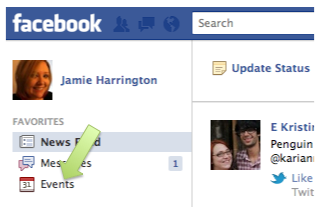
Login to your Facebook account, (as if you ever logged out, heh) and click Events:
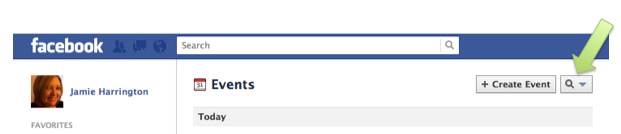
Click the magnifying glass in the top right corner:
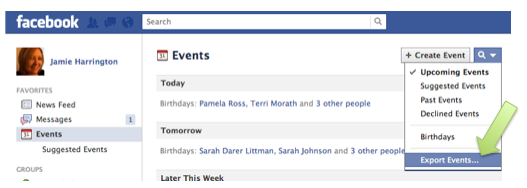
A Menu will Drop Down. Choose Export Events:
Copy the URL that appears in the pop up box to your clipboard:
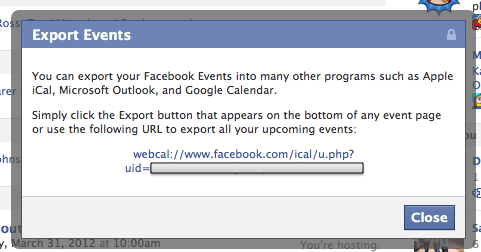
Email that link to yourself. Check your email from your phone and click the link.
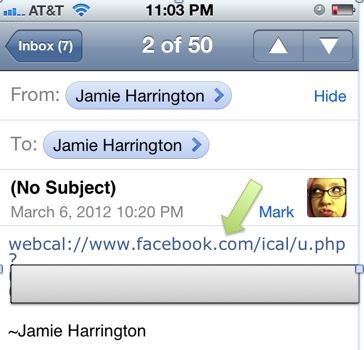
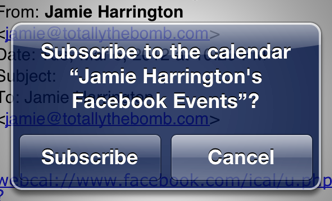
A window will pop up on your phone. Click Subscribe:
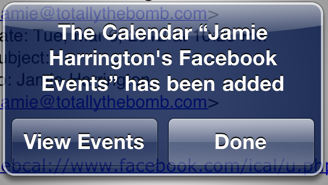
Another window will pop up after that. You can choose to view your events or cancel and go to your calendar the regular way:
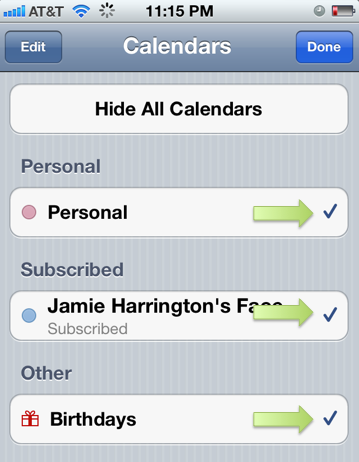
If for some reason this hides all the other calendars on your iPhone, there’s an easy fix. (It did this on my husband’s phone, but not on mine.) Go to your calendar app on your iPhone and click calendars in the top lefthand corner:
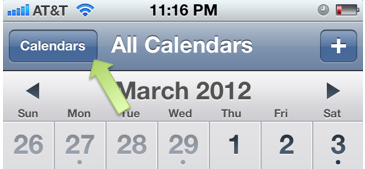
Make sure there’s a checkmark next to all the calendars you want viewable:
Now you have all your Facebook events right there on your calendar! (I also did the same thing on iCal for my Mac– that way I always have those events in the calendar programs I use every day.) Hope this helps!


Thanks understood now how to access to FB events via iPhone thank you for sharing the step by step guide.
I didn’t knew how to find the events on Facebook thanks for helping Jamie.
Thanks a lot for writing Jamie. It’s really a very helpful article.
This is really helpful stuff from you . i really appreciate your blog ..
Wonderful app. I haven’t explore this before. Thanks for sharing this one. I’m very curious about the events in my facebook. Who do you follow the most?
-Slater
Nice post. I can now use facebook much easily using my iphone, thanks to your post.
-Shane
I got tired of trying to sync everything so I said screw it and throw everything into iCal which easily goes from my Mac to my iPhone. Because of some neurological stuff I forget stuff like crazy and it saves my life and makes me look like a partial dumbass instead of a full on dumbass. Cool post.
This is a nice post. I was having problems accessing facebook properly through my iphone. This post has solved those problems.
Thanks.
-Aston
Right you are. Now a days we can easily remember our important event by the virtue of Google, Facebook and so other. Do you have any other post about necessaries of social network?
Thanks for this post,
Blake
@Blake, I think this is the only one. Thanks for reading. 🙂